
Intento Labs Intento Labs
Services & Capabilities · 15 slides
01 / 15
Production AI · Government partner · 2026
Prepared for May 2026

Turning engineering data
into AI systems.

Drawings, 3D models, documents, spreadsheets — the data your team produces every day, finally working for them. Through our products, or directly inside the AI tools you already use.

About Intento

We turn data into AI systems.
We connect data systems with AI.

A specialist engineering team building production AI for the people who design, build, and operate the physical world.

⚙️

Production-grade AI

Three products live and shipping. Real customers. Built and operated by us, end-to-end.

👥

Senior, hands-on team

Small team. Every conversation is with the people actually building the system. Toronto-based, working with clients across North America.

🏛️

Research partner

Working with the National Research Council (NRC) on applied AI for the built environment.

The Pattern We See

Engineering teams drown in their own data.

P&IDs, ISOs, 3D models, vendor specs, contracts, line lists, takeoffs, takeoff sheets, change orders — every project leaks knowledge across formats and tools.

.PDF P&ID-rev3.pdf
.DWG ISO-line-104.dwg
.IFC plant-3d.ifc
.XLSX line-list-Q3.xlsx
.DOCX spec-section-15.docx
.PDF vendor-data-sheet.pdf
.XLSX MTO-takeoff.xlsx
.RVT structural.rvt
.PDF contract-master.pdf
.JPG field-photo-1287.jpg
Locked in tools Tribal knowledge Hard to reuse Invisible to AI
What We Build

From scattered data —
to AI you can trust.

AI you can trust Structured engineering data Your files P&ID 3D / IFC SPECS CONTRACTS EXCEL ISO / DWG
01

Native to engineering data

We read the formats your team actually uses — IFC, DWG, P&IDs, ISO drawings, RVT, vendor PDFs — not just text-flattened blobs.

02

Agents that understand context

Multi-agent systems that reason about your project the way an engineer would: spatial, structural, regulatory, contractual.

03

Plugs into the tools you already have

Stand-alone product, embedded inside your Claude / ChatGPT setup via MCP, or behind your own UI. Your call.

Use Case · 01

Document comparison &
standards compliance.

Diff specs across revisions. Cross-check vendor data sheets against project standards and industry codes — ISO 13703, ASME B31.3, API, CSA, your own internal practices.

  • Side-by-side diff with cited reasoning
  • Live compliance check against any standards library you load
  • Trace requirements through FEED → detailed engineering
  • Surface conflicts before they reach the field
SPEC · rev 3
VENDOR DATA
COMPARE
AGENT
FINDINGS
ISO 13703 ASME B31.3 API 14C CSA Z662
Use Case · 02

Unstructured Excel
queryable AI database.

Decades of project knowledge lives in spreadsheets. We turn that into a clean, queryable data layer — then put a natural-language interface on top of it.

  • Ingest hundreds of workbooks without reformatting
  • Schema inferred and normalized automatically
  • Ask questions in plain English, get cited answers
  • Full audit trail · role-based access · exportable
LINESIZEMAT
P-1014"SS304
P-1026"CS
P-1032"SS316
P-1048"CS
P-1053"SS304
P-1064"CS
DATABASE
Show me all SS316 lines over 4″ from past gas-plant packages
12 lines · cited from 3 workbooks
Use Case · 03

Automated line list extraction.

The deliverable that consumes weeks of engineering time — generated in hours. Built from your P&IDs and 3D models, kept in sync as the design evolves.

  • Line number · size · material · fluid · service · insulation · P&ID ref
  • P&ID + 3D cross-validation flags inconsistencies
  • Re-runs as drawings change · diff log for engineers
  • Exports straight to your line list standard
P&ID source
L-101 L-102 L-103
Line list · generated
LINESIZESERVICEMAT
L-1014"Process gasSS304
L-1026"Process gasCS
L-1032"Instr. airSS316
Use Case · 04

Auto-generated isometric drawings.

A modern alternative to legacy ISOGEN-style tooling. AI agents read your 3D piping models and produce clean, annotated isometric drawings — ready for pipe-spool fabrication.

  • Reads native 3D piping (CADWorx · Plant 3D · SP3D · IFC)
  • Dimensions · weld points · BOM tables auto-populated
  • Consistent style across every drawing, every project
  • Re-runs in minutes when the 3D model changes
3D model
AI EXTRACT
ISO drawing
6"×24' 4"×8'
SS304 6″ pipe24'
SS304 4″ ell×2
WN flange 6″×3
Use Case · 05

Accurate & fast
quote & cost estimation.

Quote a new project the way an experienced estimator would — but in minutes, not weeks. AI reads your 3D model and scope docs together, drives takeoff, and rolls it up against historical pricing from past packages.

  • 3D + scope docs read together to drive takeoff
  • Reuses pricing & effort data from past packages
  • Line-item BOM + cost rollup with assumptions exposed
  • Sensitivity analysis for materials & labour
3D
3D model
📄
Scope docs
QUOTE
AI
Quote · Project NGP-104
Piping (1,240 m)$248K
Vessels (×3)$486K
Structural steel$172K
Labour & fab$394K
TOTAL$1.30M
Use Case · 06

Live in Navisworks — talk to your model.

We plug AI directly into the tools you already use. Keep your Navisworks model open, open a chat next to it, and ask in plain English — get takeoffs, summary tables, BOMs, clash explanations, fabrication packages straight from your federated model.

  • Reads native .nwd / .nwc with CADWorx, Plant 3D, Revit, IFC objects
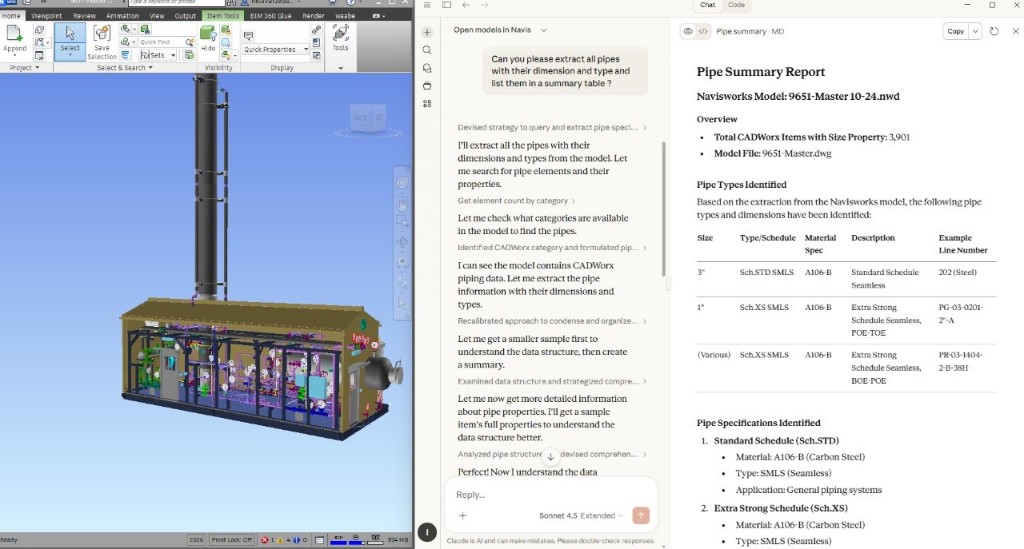
  • Plain-English query → structured table, exportable to Excel
  • Auto-summaries by line, system, area, ISO sheet, or any property
  • Layers on top of your existing workflow — no rip-and-replace
9651-Master 10-24.nwd · Navisworks + Intento ● LIVE
Navisworks model with chat-driven pipe summary extraction
3D MODEL
PLAIN-ENGLISH QUERY
CITED REPORT
Two Ways To Use It

Pick the surface that fits your team.

Same agents, same data layer, two delivery modes — use one, the other, or both.

▸ Primary

Intento Workspace

A purpose-built web UI we design and ship for your team. Project-aware, role-aware, tuned to the specific workflows your engineers actually do.

  • Branded, internal-only deployment (cloud or on-prem)
  • Connectors to your existing data sources
  • Audit trails, role-based access, exportable reports
  • SLAs and continuous improvement
user> diff Spec rev3 vs rev4 — flag any pressure-rating changes agent> 3 changes found · attached cited diff (page refs · 12) user> auto-update line list 104 from latest P&ID agent> 47 lines synced · 2 require human review
▹ And / or

MCP for Claude

The same agents, exposed as MCP tools. Plug straight into the Claude your team already uses — no new app to learn.

  • Drop-in MCP server, hosted by us or self-hosted
  • Works inside Claude Desktop and Claude Code
  • Same audit trail, same data sources
  • Your existing Claude habits, with engineering superpowers
claude> @intento extract line list from /uploads/PID-104.pdf tool> 47 lines · CSV ready · cross-checked against 3D model
Proof We Ship

We're not pitching a deck. We're shipping products.

Three production AI products, a paying government customer, and a working agentic data platform — already live.

● Live · 2026

BIMind

Multi-agent AI assistant for IFC building models. Talks to your 3D model in plain English — query it, validate it, edit it.

Try it live →
● Live · 2026

Intento Platform

Our agentic knowledge engine — the data layer that makes engineering files queryable by AI. Powers everything else we build.

See the platform →
★ Partner

NRC partnership

National Research Council partnership delivering applied AI for the built environment. Independent validation and a real customer relationship.

More on partnerships →
Also in production: EnergyAI (energy modeling pipeline) · In development: ComplianceAI (75% complete) · In R&D: the world's first in-house LLM purpose-built for the built environment.
A note on raw chatbots

A chatbot is a length of pipe.

Buying pipe at Home Depot doesn't make a transmission pipeline. The pipe is the easy part — what moves gas across a country is the system around it: connectors, specs, monitoring, codes. Off-the-shelf AI is the same.

🏠 Home Depot

Raw Claude, on its own

CLAUDE
Great for daily team work
  • Drafting · summaries · meeting notes
  • Excel formulas · explaining specs
  • General Q&A · onboarding
Where it stops
  • Can't see your 3D models, line lists, archives
  • Doesn't cite past projects or vendor data
  • No audit trail · no codes · no governance
🏭 Transmission pipeline

Claude + Intento engineering

NAVISWORKS CADWORX LINE LIST ARCHIVES MCP CITE AUDIT CLAUDE
What the system adds
  • Connectors (MCP) to Navisworks, CADWorx, archives, drawings
  • Spec & citations — every answer references real files
  • Codes & guardrails — ASME, CSA, ISO, project standards
  • Audit trail & governance — every query logged & traceable
How We Engage · Phased Adoption

Where Intento fits in your AI journey.

Foundation first. Then domain automation. Same Claude — expanding scope as your team and your data are ready.

01
Phase 1 · Foundation

Claude across the team

Every engineer, PM, and estimator gets a chat-first AI for the messy 20–30% of their day that's nobody's specialty — drafting, summarizing, comparing, debugging Excel, explaining specs.

  • Claude accounts & light governance
  • Workshops on EPF-specific prompt patterns
  • 1–2 early wins (RFP review · vendor data · meeting → actions)
  • Named AI champions emerge organically
Months 0 – 2
Bridge
Champions identified
Patterns mature
Phase 2 targets queued
02
Phase 2 · Domain automation

Claude wired into ALCO's tools

The chat box your team learned in Phase 1 stays the same — we connect it via MCP to your engineering reality. Same UX, expanding scope.

  • Navisworks · CADWorx · line lists · drawings · project archives
  • Use cases 01–06 light up against your real data
  • AI champions become internal owners of the automation
  • Workspace UI for non-Claude users · MCP for power users
Month 2+
Let's Build

Let's design the AI layer
for your engineering data.

Start with one use case. Prove the value in four weeks. Scale into a real system from there.

Hamid Kiavarz · Pouya Hallaj · hamid@intentolabs.io · Toronto · 2026
Navisworks pipe summary report — full size
CLICK ANYWHERE OR PRESS ESC TO CLOSE
